
WordPress prompt library plugin
The AI prompt manager for WordPress.
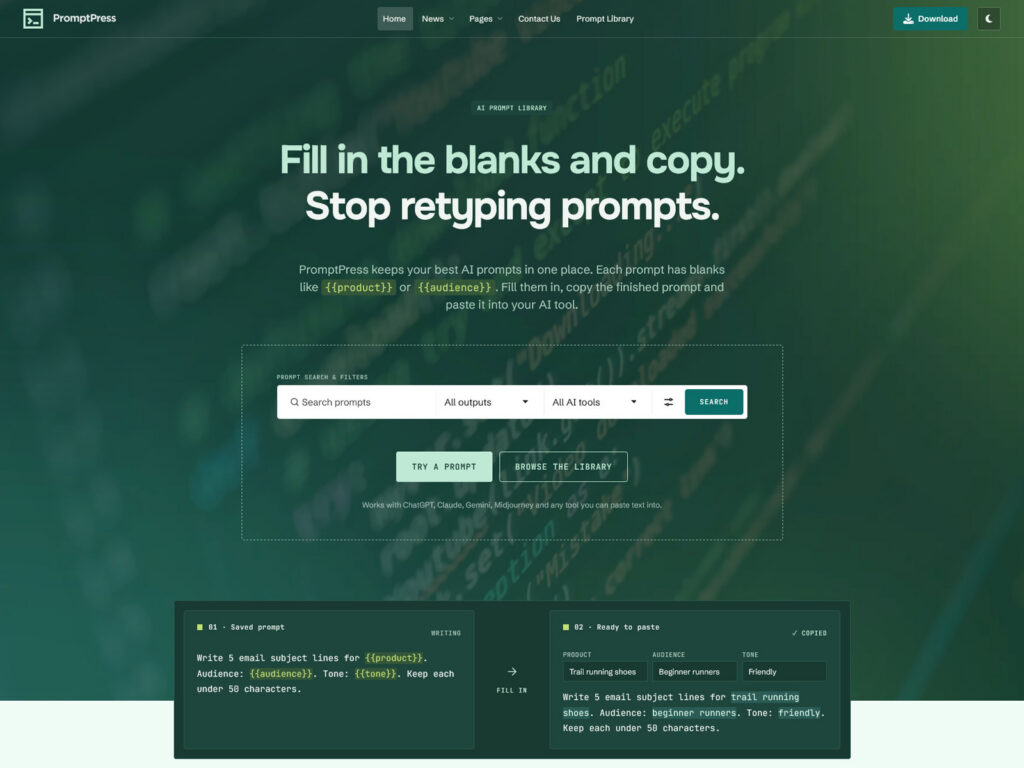
Fill in the blanks and copy.
Save, organise and share AI prompts on your WordPress site. Add blanks like
{{product}} or {{audience}}, and your team or visitors fill them in and copy a ready prompt for ChatGPT, Claude, Gemini or Midjourney.- Works with any theme
- Elementor widgets, block & shortcode
- WordPress 6.7+ · PHP 8.0+
- Documentation
- 01 · Saved prompt
Text
Write 5 email subject lines for {{product}}. Audience: {{audience}}. Tone: {{tone}}. Keep each under 50 characters.
Fill in
- 02 · Ready to paste
✓ Copied
Product
Trail running shoes
Audience
Beginner runners
Tone
Friendly
Write 5 email subject lines for trail running shoes. Audience: beginner runners. Tone: friendly. Keep each under 50 characters.
How it works
Build a prompt library in WordPress. In three steps.
Reusable prompt templates with fill-in fields. No coding, no AI expertise needed.
01
Save prompt templates with blanks
Write the prompt once and put blanks where the details change, like
{{product}}. Sort it by output, use case, project and AI tool. 02
Fill in the blanks in a simple form
Each blank becomes a form field. Type your details, or pick from a list, and preview the whole prompt before copying.
03
Copy and paste into any AI tool
One click copies the finished prompt. Use it in ChatGPT, Claude, Gemini, Midjourney or any tool that accepts text.
Features
AI prompt management for teams. Without the clutter.
Organise ChatGPT, Claude and Midjourney prompts by output, use case, project and AI tool.
Prompt templates with variables
Every
{{blank}} becomes a form field. Preview the result, then copy it in one click. Reusable instructions
Save a persona, brand voice or house rules once and add them to many prompts. Edit once, every prompt follows.
Client and brand dropdowns
Attach several client instructions to one prompt, and people choose the right client from a dropdown.
Private, team or public
Share prompts with your team only, or publish them. Public prompts get their own page with structured data for search.
Text, image and code prompts
Each output gets its own card: a use-case label, a result thumbnail for image prompts or a language tile for code.
Live prompt search
Matching prompts appear while you type. Filter by output, AI tool, project and use case.
Tested prompts & sample outputs
Show which AI tool a prompt was tested with, when, and what a good result looks like.
Elementor widgets, block & shortcode
Four widgets for Elementor and sidebars, a Prompt Library block and a shortcode. Place prompts on any page.
Works with your theme
Works with any WordPress theme. Classic or block.
AI Prompt Manager takes colors and fonts from your theme, and adds a simple default skin where your theme has no prompt styling.
- Classic and block themes, tested on Twenty Twenty-Five and Twenty Twenty-One
- Block themes: edit the prompt templates in the Site Editor
- Light and dark themes: borders and tints follow your text color
- Your prompts stay in WordPress if you switch themes
For developers
Template overrides
Copy any template into
yourtheme/prompt-manager/, per output if you like. CSS that gives way
Structural rules sit in
@layer apm with :where(), so your theme wins without !important. REST API
List prompts and assemble them through
/wp-json/apm/v1/, with cookie or Application Password auth. Hooks & PHP API
Filters for outputs, properties, schema and templates, plus
apm_assemble() and friends. Import / export
Works with the WordPress Importer. IDs and visibility are restored after import.
Pricing
Get the WordPress prompt library plugin for $9.
Introductory price for early buyers. The regular price will be $19.
AI Prompt Manager
Intro price
$9
$19
For the WordPress theme you already use.
- All features on this page
- Unlimited prompts and instructions
- Works with classic and block themes
- Elementor widgets, block and shortcode
Secure checkout via Lemon Squeezy.
Questions
Fair questions. Straight answers.
Setup steps and settings are in the plugin documentation. Something else? Write to us.
Does AI Prompt Manager work with my WordPress theme?
Yes. It works with classic and block themes and takes its colors and fonts from your theme. Where your theme has no prompt styling, a simple default skin keeps cards, forms and buttons tidy.
Do I need Elementor to build a prompt library?
No. The library has its own pages, a block and a shortcode. If you use Elementor, the four prompt widgets appear in its widget list too.
Do visitors need a ChatGPT account or an API key?
No. The plugin prepares the text. Visitors copy it and paste it into the AI tool they already use, so there are no API keys, credits or usage fees.
Can I share prompts with my team only?
Yes. Each prompt is private, team or public. Team prompts are visible to your logged-in team members only. Only administrators and editors can make a prompt public, and private and team prompts stay out of search engines.
What happens to my prompts if I uninstall the plugin?
They stay in your database. The plugin only deletes its content on uninstall if you switch that on in its settings.
What do I need to run it?
WordPress 6.7 or newer and PHP 8.0 or newer. For click-to-enlarge result images, install the free Lightbox for Gallery & Image Block plugin. Setup steps are in the documentation.
Will the price stay at $9?
No. $9 is the introductory price for early buyers. The regular price will be $19.
Made for it: PromptPress
Want the best look? Use the PromptPress theme.
PromptPress is our WordPress theme built around AI Prompt Manager. The plugin is included, and every prompt page, card and search bar is styled to match.
- One-click import of the complete demo prompt library
- Light and dark mode with a switch in the header
- Prompt pages with a properties sidebar and related prompts
- Built for Elementor, with colors and fonts set in one panel
demo.themnific.com/promptpress
Start your WordPress prompt library today.
Save your best AI prompts once. Let your team and visitors fill in the blanks and copy. $9 introductory price, regular $19.
Questions first? Read the documentation or contact us.