The WordPress Magazine Theme That Gives You Editorial Precision Without the Developer
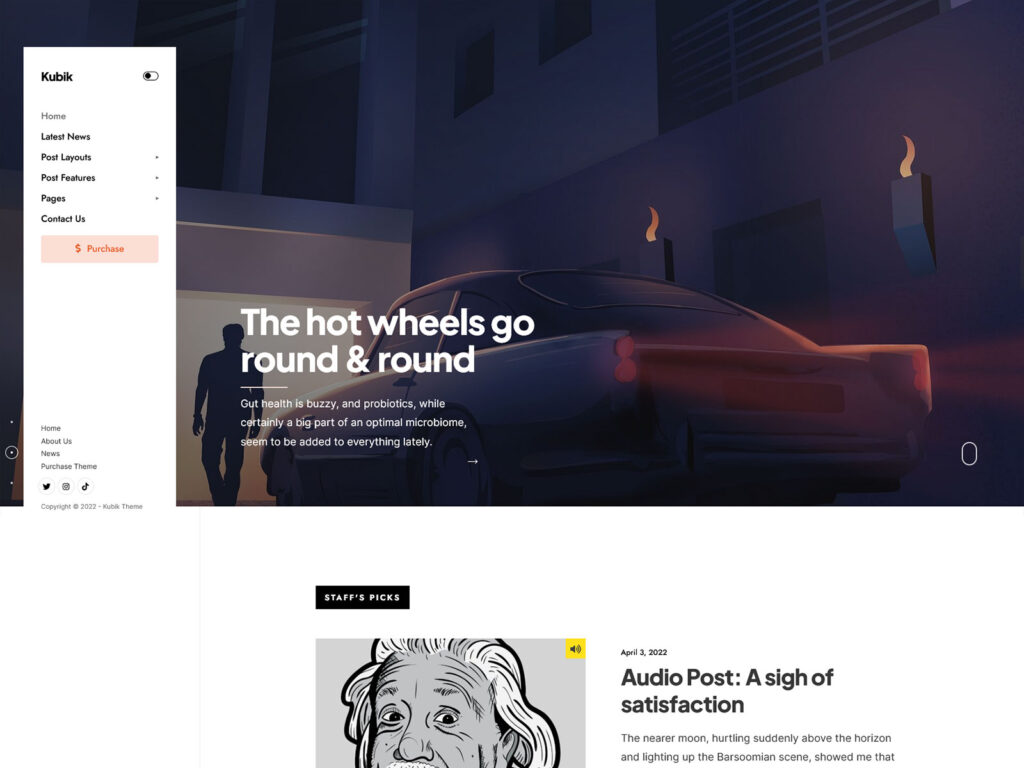
Kubik is an experimental magazine theme designed especially for journals, niche publications, and independent bloggers looking for total editorial control with no need for any coding. Kubik includes Elementor page builder compatibility, custom-built magazine blocks, and one-click demo installation, allowing you to launch a complete magazine website quickly. Unlike universal all-purpose themes that attempt to please everybody, Kubik is focused on the needs of editorial magazines.
Who Is This For?
Independent Niche Journal Editor
You are launching a focused online journal and need a homepage layout you can rearrange without touching code. Kubik’s modular Elementor-based homepage and pre-built magazine blocks let you set up and iterate on your layout visually.
Solo Blogger Moving to a Structured Magazine Format
You have been running a simple blog and want to move to a multi-section magazine layout for a WordPress niche blog without rebuilding everything from scratch. The one-click demo import loads a ready-made structure you can overwrite with your own content immediately.
Small Local Media Team
You need multiple post layouts (with and without sidebars, hero headers) to separate news types and feature stories. Kubik includes six post layout options so different editorial formats do not require custom page templates.
WordPress Developer Building for an Editorial Client
Your client needs a magazine website with a clean, easy-to-manage backend.. This is made possible due to the use of the child theme, options panel with Redux framework, and Elementor drag-and-drop functionality.
Key Features
Dannci Magazine Blocks for Elementor: Adds a dedicated set of magazine-specific content blocks directly into Elementor, so you are not improvising editorial layouts from generic widgets.
Modular Homepage with Full Layout Control: The homepage is built in sections you can reorder, remove, or replace in Elementor. You are not limited to one homepage template or forced into a preset grid.
Six Post Layout Options: Left sidebar, right sidebar, no sidebar, combined with classic or hero-style title sections. Choosing the right layout for a given post type takes seconds.
One-Click Demo Import: Imports the demo content, widgets, and settings in a single step. You skip the configuration grunt work and start editing real content faster.
Redux Options Panel with Google Fonts and Color Schemes: Typography and color are managed through a structured admin panel, not scattered across Customizer options. You can set a consistent brand without hunting through menus.
Lightweight, SEO-Optimized Code Base: Pages include structured data markup and clean HTML5 output. No third-party sliders, no bundled icon libraries you did not ask for, no scripts loaded on pages that do not need them.
Core Architecture and Theme Specs
| Category | Plugin(s) |
|---|---|
| Page Builder | Elementor (free version sufficient), Elementor Pro (compatible, not required) |
| Magazine Blocks | Dannci Magazine by Themnific (adds editorial blocks to Elementor) |
| eCommerce | WooCommerce |
| Forms and Email | Contact Form 7, Mailchimp for WP |
| Performance | Autoptimize |
| Widgets | Classic Widgets |
| Translation | Translation ready (.pot file included) |
| SEO | Built-in structured data markup. Compatible with Yoast SEO |
Use Cases
Experimental Niche Journal: Set up the modular homepage with two or three block sections to separate your main editorial category from secondary topics. Use the hero post layout for long-form feature pieces to give them visual priority over standard news-style posts.
Personal Blog with a Magazine Feel: Use the one-click demo import to start from a working multi-column layout, then reduce it down to a single main feed with one featured section at the top. The six post layout options let you present shorter posts differently from long reads without creating custom templates.
Small Digital Publication: Assign specific post layouts to editorial categories (for example, right-sidebar for news, no-sidebar for opinion pieces). The Redux options panel handles typography and color scheme as brand settings of your WordPress niche magazine site, so your visual identity stays consistent across editors without a style guide doc they need to consult.
Why a Focused Theme Outperforms a Multipurpose One
Multi-purpose WordPress themes are designed to be used for portfolios, e-stores, landing pages, and blogs within a single installation. The multiplicity implies that such themes load CSS rules, JS files, and templates that your website does not need at all. Every unnecessary element adds weight to the page and causes additional HTTP requests for the browser to solve.
Kubik loads only what an editorial WordPress theme for online magazines and blogs actually needs. There are no bundled sliders pulling in jQuery plugins on pages that do not display a slider. There are no WooCommerce template overrides on sites that are not selling products. This can contribute to a leaner critical rendering path and may improve Core Web Vitals performance compared to heavier multipurpose themes.
For a content-first site where Google is a primary traffic source, Core Web Vitals scores are a ranking signal. A theme that starts lean gives you a real baseline advantage before you apply any additional performance optimization. Autoptimize is listed as a compatible plugin for further asset optimization, but you are not starting from a deficit to begin with.
Frequently Asked Questions
Does this theme require Elementor?
Kubik is built for Elementor, so you do need it installed for the homepage and page builder features. The free version of Elementor is enough. Elementor Pro is compatible but not required. The Dannci Magazine plugin adds the editorial-specific blocks into Elementor’s widget panel.
Can I use Kubik for a paid subscription or members-only publication?
Kubik does not include built-in membership or paywall functionality. WooCommerce can be used with the theme, and you could consider adding a membership plugin to it if necessary. But this will not be within the framework of the theme’s functions, so do your research beforehand.
What support is included with the purchase?
Your purchase includes access to the Themnific support portal and the online documentation. Support covers theme-specific issues: setup, configuration, and confirmed bugs. It does not cover plugin conflicts from third-party plugins, custom code modifications, or general WordPress troubleshooting. Response times are typically within one business day.
Will this theme keep working after future WordPress updates?
Kubik is actively maintained and listed as compatible with WordPress 6+. Themnific tracks WordPress core updates and releases compatibility patches when needed. The theme has been in active development for several years. No theme can guarantee compatibility with every future release in advance, but active maintenance means issues are addressed promptly when they arise.